You might think you already know wildcards in Excel.
Most people use them in COUNTIF or maybe
XLOOKUP and stop there. That is only scratching the surface.
Wildcards appear in far more places than formulas, and when you combine them with other Excel tools, you can solve problems faster and with less effort.
In this guide, you will learn
both the basics and several advanced uses that can improve how you work with data.
SPONSORED
Spend 70% less time turning your
Excel data into PowerPoint charts to focus on the work that makes an impact.
think-cell, the leading PowerPoint add-in for business presentations, helps you build powerful data visualizations in minutes.
Link slides to Excel to automate chart creation for error-free reports
Update slides instantly when making Excel changes
Seamlessly transfer conditional formatting to PowerPoint charts and tables
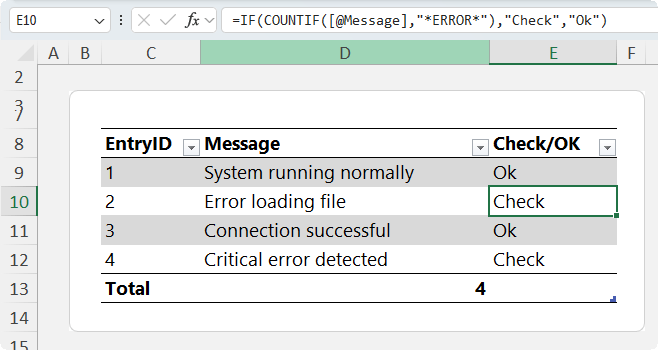
This allows you to flag rows based on text patterns:
Escaping Wildcards
If your data contains actual wildcard characters, Excel will still treat them as wildcards.
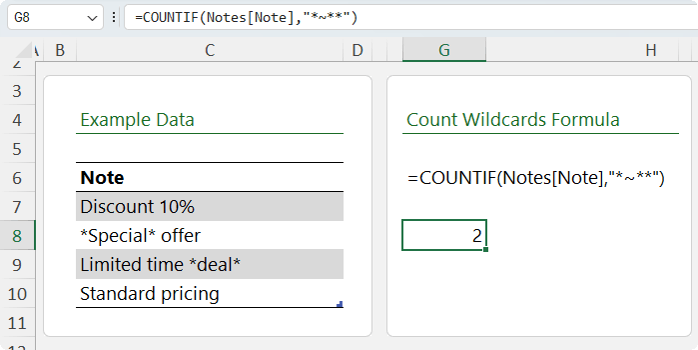
To search for a literal asterisk:
=COUNTIF(Notes[Note], "*~**")
The tilde tells Excel to treat the asterisk as a normal character.
This is often overlooked and can lead to incorrect results.
Conditional Formatting with Wildcards
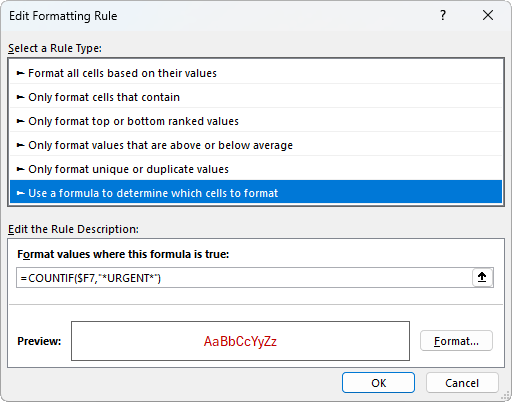
You can use wildcard logic in conditional formatting to
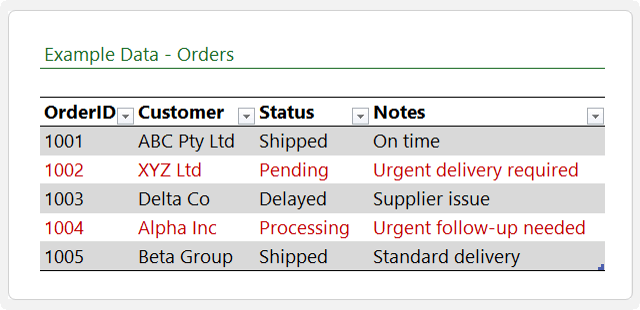
highlight rows, for example the rows below where the Note contains 'urgent':
Example:
=COUNTIF($F7,"*urgent*")
Apply this as a rule to highlight rows containing the word urgent.
This is especially useful when you want to format multiple columns based on text in a single column, which can't be done with the built in conditional rormatting tools.
Why Wildcards Matter More Than You Think
Wildcards may seem simple, but their real value comes from combining them with:
• Lookup
functions
• Dynamic arrays
• Data validation
• Filters
• Conditional formatting
Once you start using them across these tools, your workflow
becomes faster and more flexible.
Take Your Excel Skills Further
This type of logic is what separates basic Excel users from confident, advanced users.
If you want to get comfortable combining formulas, validation, and data tools, the Excel Expert course walks through everything step by step.
You will learn how these
features connect so you can build spreadsheets that are both powerful and reliable.
Final Thoughts
Wildcards are one of those features that look simple at first.
Once you start combining them with Excel's tools, they become a powerful way to search, clean, validate, and analyse data.
Most users stop at the basics. That is where the opportunity is.
Have a great day,
Mynda Treacy
Co-founder My Online Training Hub
Did someone forward this email to you?
Want to sponsor our newsletters? Just reply to this email to get in touch with us.
Learn With Us
This email may contain affiliate links. This means I may earn a commission should you choose to make a purchase using my link. But we only promote courses we believe will benefit you.







 Learn With Us